Lecture 1: Web Design Overview
Overview:
- The Nature of the Web
- History and Evolution of Web Design
- Web Standards
- Layers Model of Web Design
- Client-Side vs. Server-Side Coding
- Static vs. Dynamic Content
- Structural Markup: From SGML to (X)HTML
- Browsers
- Key Themes in Modern Web Design
The Nature of the Web
- Since the beginning of the Web, websites have involved client-server interactions.
- The client is whatever device you are using to access the website or web application. This could be a browser on a desktop computer or laptop, a microbrowser in a mobile device, or another program used to access the Web.
- The server is a computer that hosts the files in question and serves (sends) you the requested information, which is broken up into data packets that are routed over the Internet to your computer and re-assembled upon arrival.
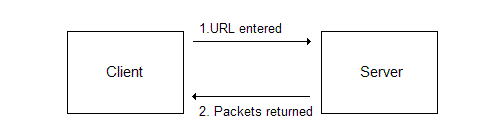
For most of the Web's history (and the vast majority of its traffic) this relationship has been synchronous, meaning that data was only sent from the server when requested.
For example, to go from page to page in the website you would click a link or button. The requested page would then be sent by the server. That back-and-forth was synchronized; the server would not send you a file until you requested it.
- Recent developments in web design have begun to incorporate asynchronous data transfer, meaning that data is being sent from the server without an explicit request from the client. Google Maps is a good example of an asynchronous setup.
- Finally, the web is stateless, which means that a web page has no "memory" of what was entered previously or done previously. In essence, each page is a blank slate. What was viewed before does not impact what is currently being viewed. We have to create that "memory" via client-side or server-side technologies.
- So, to sum up the nature of the Web, it is a stateless client-server interaction that is usually synchronous in nature.
History and Evolution of Web Design
- Web design has changed significantly from its early days and continues to evolve; new technologies are introduced and in some cases existing technologies are used in novel ways.
- Early '90s: Characterized by minimal tagging of information and simple graphics. NCSA Mosaic was the dominant browser.
- Mid-to-Late '90s: Websites become more complex in functionality, more graphically involved, and the code becomes a tangled mess. Proprietary tags are commonplace. The "browser wars" occur between Netscape Navigator and Microsoft Internet Explorer (IE) as they fight for market share. IE wins.
- Early '00s: Web standards rise in importance and browsers mature in their capabilities. Accessibility starts to be considered in web design.
- Mid '00s to Present: Web design shifts back toward a focus on text and less on graphics. Structure of information, its presentation, and behavior are separated rather than being tangled together. Accessibility continues to gain importance. The Firefox browser is released and begins to take market share from IE.
Web Standards
- The standards body for the Web is the World Wide Web Consortium (W3C); their website is www.w3.org
- The W3C creates standards, called Recommendations, which are developed by working groups. Working groups draw members from organizations around the world.
- The standards that we focus on in this class are XHTML (Extensible Hypertext Markup Language) 1.0 and CSS (Cascading Style Sheets) 2.1
- Standards define what is allowed in a language. Newer versions of standards also indicate what parts of earlier versions are deprecated, which means that they should no longer be supported by browsers and other clients. Note that it can take some time before deprecated things lose browser support, as browser manufacturers strive to maintain backward-compatibility with existing websites written to the earlier standard.
- Why do we need standards? In the early days of the Web, there were no standards or limited standards and so browser manufacturers began to introduce their own proprietary tags and attributes. This resulted in websites that were "optimized" for one browser over another (typically these websites featured disclaimers stating "This website best viewed in...").
With standards in place, and browsers supporting those standards, web design becomes easier (fewer workarounds are required) and users can surf the web with fewer hassles.
We also have greater confidence that our code will work across a wide variety of devices and environments, as long as those devices are standards-compliant.
Layers Model of Web Design
- One way to think about a website is in terms of the various aspects that comprise the site. These aspects are referred to as layers; that phrase is instructive because it suggests not only that these are separate from each other but that they also build on each other.
Modern web design views this in terms of three layers:
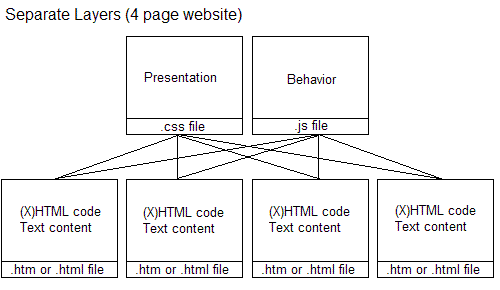
Structure: This is the (X)HTML tagging that holds the text information and other content, such as images. This defines the document structure, such as headings, paragraphs, etc.
Presentation: This is the CSS that styles the (X)HTML tags.
Behavior: JavaScript causes website changes based on actions that users take, based on time elapsing, etc.
- Note that not all websites need to have all three layers. We start off with just the structural layer in this class, then add in the presentation layer later. The behavior layer is covered in INP 271: Web Coding III.
One of the most significant problems with websites today is that they have intermingled structure, presentation, and behavior in the same file. This makes code harder to modify, complicates site redesigns, and makes it impossible to re-use presentation and behavior information without copying it into every page.
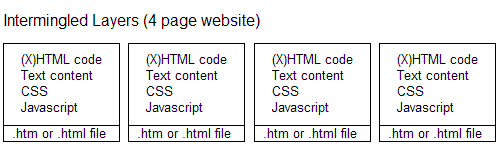
- A much better approach is to separate the layers into different files, which makes it very easy to change presentation and behavior and promotes re-use of the code.
Client-Side vs. Server-Side Coding
- As mentioned earlier, the Web is a client-server setup. When we talk about languages used to build web pages, we can group them into one of two categories: client-side or server-side.
- Placement in a category depends on where the language is interpreted (read for meaning).
- All of the languages mentioned so far (XHTML, CSS, and JavaScript) are client-side languages, because they are entirely interpreted in the client device (e.g., the browser). This is a great benefit for us, because all that you need in order to write web pages with those languages is a browser. You don't even need an Internet connection! You just need to open the file in the browser and it will work (assuming the code is written properly, of course).
- Servers just send the files written in client-side languages to the browser (or whatever client you are using) without any interpretation.
- Server-side languages, of which there are many, are beyond the scope of this class. Some examples are PHP, ASP, JSP, ColdFusion, Perl, Python, etc. Files written in these languages are interpreted on the server by a special interpreter program and the end result of that is sent to the client. Note that the end result of the server-side interpretation will be text information along with potentially some (X)HTML, CSS, and/or JavaScript.
- When comparing client-side to server-side languages, a useful analogy is that of a courier delivering documents. If the document is written in a client-side language (which is determined by its file extension) the courier just delivers it without reading it, because the recipient can read the message just fine on its own. If the document is written in a server-side language (again, this is usually determined by its file extension), the courier reads the letter, translates it into something that the recipient can read, and then delivers that.
- One of the major drawbacks to client-side languages is that anyone can read your code using the 'Source' or 'Page Source' option in the browser's 'View' menu. Server-side languages do not have this issue, because the instructions written in that language are replaced with text information and potentially some (X)HTML, CSS, and/or JavaScript.
An example would be a small piece of server-side code that retrieves the current date from the server and outputs that to the page. The code that retrieves the current date is removed once that interpretation occurs on the server side; in its place is the current date (which we see on the screen and also when we view the source code for the page).
Static vs. Dynamic Content
- Our focus in this class is on static web pages, also referred to as hard-coded pages. In a static setup, the text content that appears on the page is typed in (or inserted via copying/cutting and pasting) and saved in the .htm or .html file (either file extension is fine). The (X)HTML code and the CSS will not change unless we make edits directly to those files ourselves.
- In contrast, dynamic web pages pull their content from a database, a separate text file, or have some content generated by commands in JavaScript or in a server-side language. The output of these files can change each time the browser window is reloaded.
Using the earlier example of server-side code that retrieves the current date, if that page was reloaded at midnight the date would dynamically change.
Structural Markup: From SGML to (X)HTML
- The first half of the material for this course focuses on structural markup, which is the tags and attributes that describe the nature of the information in a web page.
- For example, there are tags that describe headings, tags for paragraphs and divisions in a document, and tags that identify lists, just to name some of the possibilities.
- The best way to think of a web page is as a document, in much the same way that you would write a document in Microsoft Word. In your Word document you would identify some text as headings and other text as subheadings; the same is true in web pages. Underlying all the visual eye-candy that can be used in a website is its document structure.
Ideally, that structural tagging is accurate in describing the web page content. The benefits of accuracy here are many: search engines such as Google give more weight to properly tagged information, other web languages work better with your document, and browsers respond in a consistent fashion.
- Standard Generalized Markup Language (SGML) was created decades ago and was used to create other markup languages. SGML is very customizable and powerful, but can be quite involved for development.
- As a way to open up web authoring to a broad audience, HyperText Markup Language (HTML) was created as a non-proprietary markup language based on SGML, and was intentionally simplified to lower the bar for writing in the language.
- HTML evolved through a series of standards, including HTML 2.0 (November 1995), HTML 3.2 (January 1997), HTML 4.0 (December 1997), and HTML 4.01 (December 1999). As part of its evolution, HTML began to incorporate tags that were focused on presentation rather than document structure. Over time, with the advent of Cascading Style Sheets for presentation, those presentationally-focused tags have been deprecated.
- HTML's simplicity and flexibility, unfortunately, are also its weaknesses. The Web contains countless documents written in sloppy HTML, which earlier browsers did their best to render properly (Internet Explorer, for example, fixes bad HTML code as it renders the page). Many web pages also use presentational tags or incorrectly use structural tags, contributing to a significant code mess. This problem is exacerbated by tools that enable users to 'Save as HTML', which tends to produce horrific markup.
- In February 1998 the W3C finalized the specification for eXtensible Markup Language (XML) 1.0, which is an incredibly flexible markup language based on SGML. XML is used for describing data in a variety of environments, including the Web.
- Where problems arise is that XML is very strict about syntax, which are the rules governing how code is written. Since HTML can be written in a very sloppy fashion, trying to have an HTML and XML document work together is unlikely to work properly.
- To resolve this issue, the W3C introduced XHTML (eXtensible HypterText Markup Language) 1.0 in January 2000. XHTML 1.0 is HTML 4.01 rewritten as an XML language, so that it conforms to the stricter syntax requirements of XML.
To compare the two markup languages (HTML 4.01 and XHTML 1.0), the following example is valid HTML 4.01:
<P ALIGN=CENTER>Hello world!
The same code written in XHTML 1.0 is:
<p align="center">Hello world!</p>
Note the differences between the two languages:
XHTML tags (
<p>indicates a paragraph) must be lowercase and closed (the</p>closes the paragraph).Attributes (
alignis an attribute) must also be lowercase and their values must be surrounded by quotes.
- Our focus is on XHTML 1.0 in this course. While the W3C has moved on to XHTML 1.1 and XHTML 2.0, they are not backward-compatible with older browsers and so the web development community has not embraced these yet. XHTML 1.1 and XHTML 2.0 are modular, which allows them to be integrated with other markup languages and tailored for specific devices.
Browsers
- Note: Statistics are from Browser News
- Internet Explorer 5.x (Mac / Windows): The market share for these browsers continues to drop, especially on the Mac side because Microsoft has no plans to update the browser and so Mac users have switched to other browsers. Each website attracts a different user base, but expect 1.5 - 3% on Windows and <.5% on the Mac. IE 5.x browsers have some quirks and limitations in their Cascading Style Sheets support that require workarounds, although the bugs differ from the Windows to the Mac version (since they use different rendering engines).
- Internet Explorer 6 (Windows only): Undeniably the leader in market share, with 60-70% of users surfing the Web using the browser. Unfortunately, IE 6's partial support for some web standards limits what can be done on the Web.
- Internet Explorer 7 (Windows only): Released not too long ago, IE 7 has slowly begun to take market share from IE 6. IE 7 expands standards support and fixes some IE 6 bugs, but many web developers view these enhancements as too little and too late. Currently accounts for about 8-10% of usage.
- Firefox / Mozilla / Netscape 6+ (Mac / Windows / Linux): These browsers use the Gecko rendering engine, and so are collectively referred to as Gecko-based browsers. Around 12% of users surf with these browsers, with the numbers steadily increasing over time. These browsers have solid support for web standards.
- Opera (Mac / Windows / Linux / FreeBSD / Solaris / OS/2 / QNX): Opera accounts for approximately 1 - 1.5% of web traffic. Opera has solid support for web standards. Opera has been busy establishing itself in the mobile market as a popular browser for those devices.
- Safari (Mac only): This browser, developed by Apple, has steadily improved its support for web standards. Safari accounts for 2-4% of total market share (being Mac-only limits its potential market share).
- Netscape 4.x (Mac / Windows / Unix): Usage has dipped below .5%, although users with old computers will continue to have this browser. Given its limited standards support, the browser is used for testing to ensure that websites degrade acceptably in older browsers.
Key Themes in Modern Web Design
- Separate structure, presentation, and behavior: As described earlier, this makes our jobs as web designers much easier. Search engines and other programs reading through web pages also experience fewer difficulties.
- Write accessible code: Accessibility refers to making web content easy to access and easy to understand for all users, regardless of physical or mental impairments. Using XHTML 1.0 properly definitely supports accessibility.
- Write efficient code: Our focus will be on writing streamlined code that will download and render quickly. This reduces bandwidth costs and also reduces the chances of users leaving because they are tired of waiting for the page to load.
- Strive for cross-browser, cross-platform consistency, but plan for graceful degradation: We will be testing our code primarily in Windows browsers, with Safari rendering being tested at http://www.browsrcamp.com/
Students with Macs can also test on other Mac browsers, but this is not required.
It is also important to ensure that in old browsers like Netscape 4.x that the content can still be read.