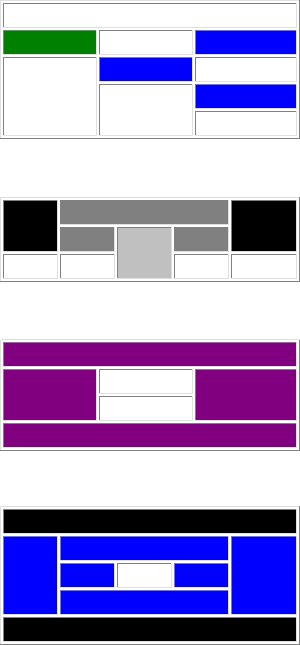
Lab 9: Practice with Tables colspan and rowspan
Instructions:
- For this lab you will be creating a new page (lab9.htm) and creating the layouts shown below.
- Use XHTML 1.0 Transitional for this lab.
- Put in a meta tag indicating that you are the author of the page.
- Also put in a meta tag for description.
- If you want to put in meta tags for robots, cache-control, pragma, and expires, that would be fine. Whether you include them or not is at your discretion.
- Each table is 300 pixels wide.
- The first table uses #008000 and #0000ff as background colors.
- The second table uses #000000, #808080, and #c0c0c0 as background colors.
- The third table uses #800080 as a background color.
- The fourth table uses #000000 and #0000ff as background colors.
- Within a given table each column is the same width.
- Use a non-breaking space in each cell to hold them open.
- Validate your code at the W3C validator (validator.w3.org). Make any indicated corrections to achieve successful validation.
- Copy lab9.htm to your labs directory, on both the student server and your removable media.
- Update your class page to link to lab9.htm and also include a link back to your class page at the bottom of the lab page.