Homework 6
Scenario:
Your task is to code a wireframe template for eMerge Web Solutions; this would be appropriate for usability testing purposes.
Screenshots:
Your goal is to recreate as exactly as possible the following screenshots in the target browsers:
- Gecko-based browsers
- Opera
- IE 7 (Note: Underline on abbreviations will not appear.)
- IE 6 (Note: Underline on abbreviations will not appear.)
- Safari 2.x
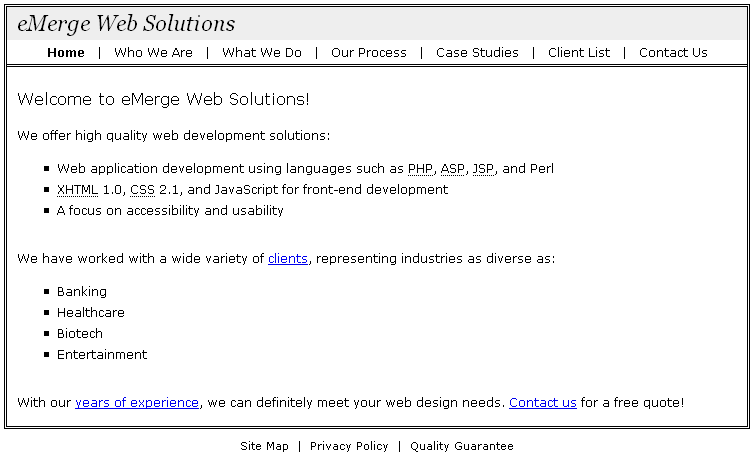
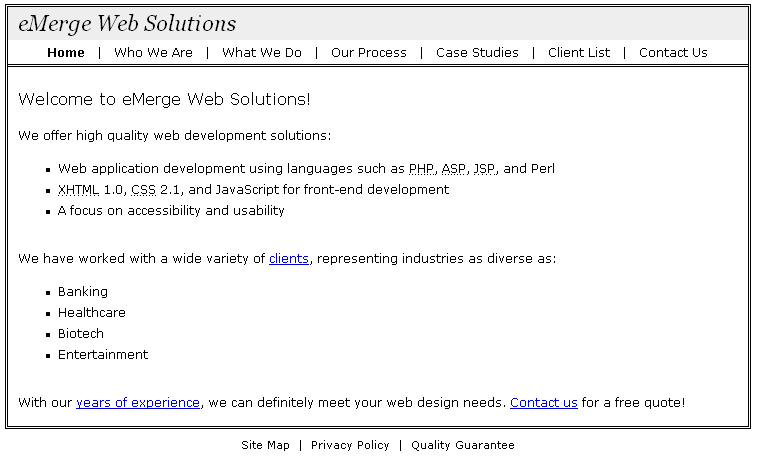
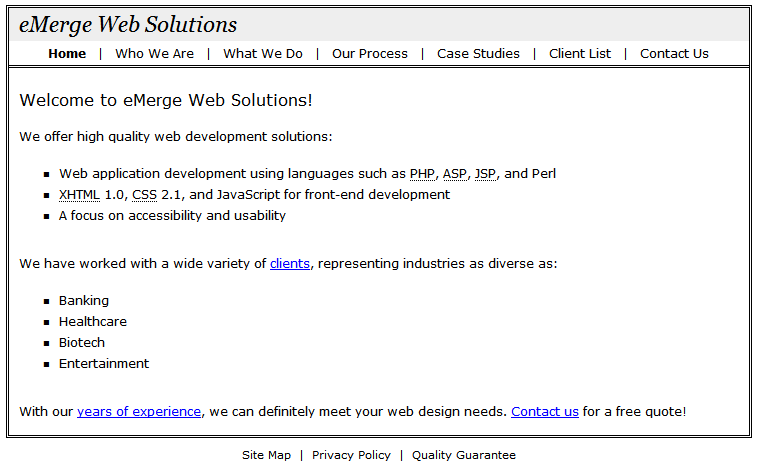
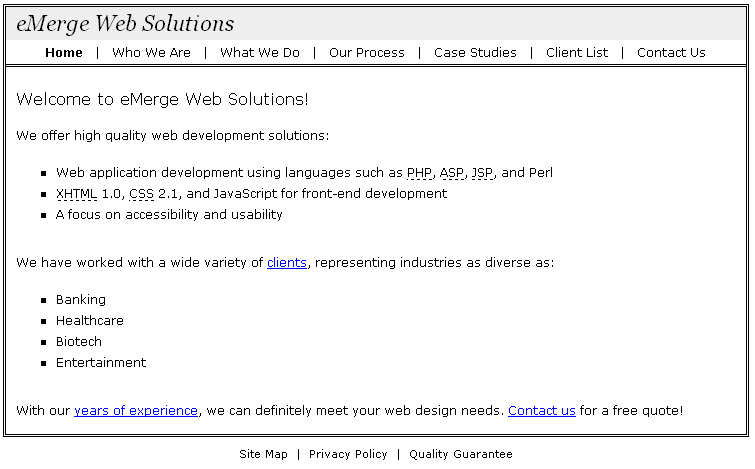
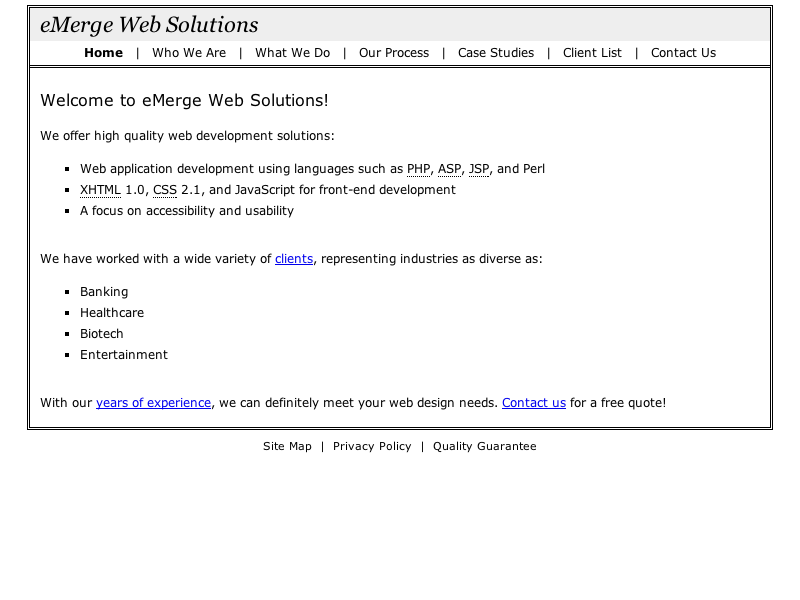
Note that the layout is centered in the browser window, which a screenshot cannot adequately convey.
Specifications:
CSS Implementation:
- Implement CSS entirely with a single stylesheet brought in via the <link /> approach.
- The following properties and values (values indicated in parentheses) were used in creating the solution:
background (#eee)
border or specific border-side (1px dotted #000, 3px double #000)
color (#000)
cursor (help)
font or font-family (verdana,geneva,lucida,arial,sans-serif; georgia,serif)
font or font-size (11px, 12px, 16px, 22px)
font or font-style (oblique)
font or font-weight (normal)
line-height (1.5)
list-style (square)
margin or a specific margin-side (0, 3px, 5px, 15px, 30px, auto)
padding or a specific padding-side (0, 3px, 10px, 20px)
text-align (center, left)
text-decoration (none)
width (740px)
Tags/Attributes/Properties and Coding Approaches Not to Use:
- Tables (no tables are used in the layout)
Layout:
- All spacing is controlled via the Box Model.
- Disable padding and border (set them to 0) for 'body' to eliminate extra space coming from the browser window.
- The layout is a fixed width of 740 pixels (which totals 746 pixels in the latest browsers when the 3px double #000 border is added to the left and right sides; Windows IE 5.x keeps the total layout width at 740 pixels due to its flawed box model).
- The layout is centered on the page using CSS, (margin-left/margin-right "auto").
- Create 5 pixels of vertical space between the layout and the top of the browser window; the margin property would work well for this when applied to a <div> </div>.
- The top and bottom navigation have padding above and below of 3px and their content is centered.
- The top navigation has a bottom border of 3px double #000.
- There is 20 pixels of space between 'Welcome to eMerge Web Solutions!' and the 3px double #000 border line above it.
- There is 10 pixels of space to the left of 'eMerge Web Solutions'.
- The content area (from 'Welcome to eMerge Web Solutions!' down to the last sentence before the bottom navigation) has padding on the left and right sides of 10px.
- Paragraphs have 15 pixels of space above and below them.
- Unordered lists have 30 pixels of space below them.
- List items are separated by 3 pixels of vertical space and use the 'square' list style.
Fonts, Text Presentation, and Background Colors:
- Most text should use the following font sequence: verdana,geneva,lucida,arial,sans-serif.
- All content has a 1.5 multiplier for line-height.
- Use an <h1> for 'eMerge Web Solutions'. Turn off margins for this heading (or display it as inline) to eliminate the default margin space that Gecko-based browsers and Opera would otherwise put above it. Text sixe is 22 pixels and the style is oblique. This heading uses 'georgia,serif' for its font family information. The default boldface appearance is disabled. This heading has a background color of #eee. Note that if you decided to display the heading as inline that the background will not stretch far enough; you would need to wrap the heading in a block-level element and apply the background to that block-level element.
- Use an <h2> for 'Welcome to eMerge Web Solutions!'. Turn off margins for this heading (or display it as inline), for the same reasons as given previously. Text size is 16 pixels. The default boldface appearance is disabled.
- Text in the bottom navigation is 11 pixels.
- The rest of the content on the page is 12 pixels.
- Top and bottom navigation are separated by the | character as well as a mix of non-breaking and regular spaces. The | character is typically near the Enter key.
- Use <strong> </strong> tags for 'Home';
Linking and Link Behavior:
- There is no link from this page to your class page. However, you should link from your class page to this assignment. Use a relative link.
Abbreviations:
Some of the text in the content area uses <abbr> </abbr> tags. That text and its title is as follows:
PHP --> PHP: Hypertext Preprocessor
ASP --> Active Server Pages
JSP --> Java Server Pages
XHTML --> eXtensible Hypertext Markup Language
CSS --> Cascading Style Sheets- Use the 'help' cursor when the abbreviations are moused over.
Cross-Browser/Cross-Platform Rendering:
- IE 7 / Gecko-Based Browsers / Opera: Rendering is very consistent. Opera renders the square list items the smallest. IE7 abbreviations do not alter an item's appearance.
- IE 6: The 1px dotted borders render as 1px dashed. Abbreviations are not supported.
- Mac Browsers: Modern Mac browsers render consistently.
Validation, Code Efficiency, and Coding Style:
- Validate your code at the W3C validator (validator.w3.org). Your code should achieve perfect XHTML 1.0 Strict validation.
- Validate your CSS at the W3C CSS validator (http://jigsaw.w3.org/css-validator/).
- Be sure to use XHTML tags appropriately to show structure and be efficient in your coding.
- Provide an appropriate <meta> author element containing your name.
Submitting Your Work:
- Print out your code in landscape mode
Due:
- Start of class Monday July 30.