Lecture 2: Coding a Web Page
Overview:
- Selecting a Doctype
- Adding <html> and Specifying Document Language
- Not Losing Your <head>
- Giving it a Little <body>
- Building Starter Templates
- Validating Your Code
Selecting a Doctype
- Doctypes define the document type being used, such as HTML, XHTML, etc. They also specify the version of the language (e.g., HTML 4.01, XHTML 1.0) and can also indicate what tags/attributes are being supported.
- Doctypes should be the first line of code in your web page.
Some web authors are tempted to start their XHTML pages with an XML prolog (<?xml version="1.0" encoding="UTF-8"?>) because XHTML is written for XML compatibility, but I advise that you never include the XML prolog because of Internet Explorer 6 (IE 6). If IE 6 does not find a doctype on the first line of code, it uses a non-standard rendering mode called either Quirks or Bugwards mode. This can then lead to other rendering problems. IE 7 fixed this problem, but IE 6 is still the dominant browser.
In XHTML 1.0 there are three doctypes available, although for this class only the first two will be used (frames are covered in INP 170: Web Coding II):
XHTML 1.0 Transitional Doctype:
<!DOCTYPE html PUBLIC "-//W3C//DTD XHTML 1.0 Transitional//EN"
"http://www.w3.org/TR/xhtml1/DTD/xhtml1-transitional.dtd">
XHTML 1.0 Strict Doctype:
<!DOCTYPE html PUBLIC "-//W3C//DTD XHTML 1.0 Strict//EN"
"http://www.w3.org/TR/xhtml1/DTD/xhtml1-strict.dtd">
XHTML 1.0 Frameset Doctype:
<!DOCTYPE html PUBLIC "-//W3C//DTD XHTML 1.0 Frameset//EN"
"http://www.w3.org/TR/xhtml1/DTD/xhtml1-frameset.dtd">
- Doctypes are critical when you validate your code; validation refers to checking your code for compliance with the indicated specification.
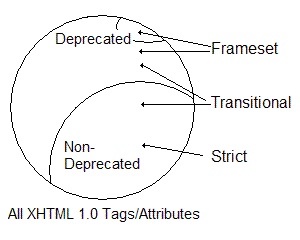
- The Transitional doctype permits deprecated tags and deprecated attributes to be used. It is intended for web pages where tags/attributes are still being used for presentation and where CSS usage is limited.
- The Strict doctype does not allow any deprecated tags or deprecated attributes to be used and has some other considerations that we will discuss in future lectures. Thus what is valid under Strict doctype is a subset of what is valid under Transitional. CSS is used for presentation. This is the doctype to use when separating structure from presentation.
- The Frameset doctype is used for frames-based layouts. It is essentially the Transitional doctype plus a few additional deprecated tags/attributes specific to frames.
The following image shows how the three doctypes are related:
- As mentioned previously, one purpose of doctypes is to assist in validating your code. If you specify the Strict doctype but then use a deprecated tag and/or attribute, the validator will notify you of this error.
- You will come across a variety of doctypes in use on the Web, including fragmented versions of the doctypes shown above.
Important: If a doctype lacks the URL or Uniform Resource Locator (also referred to as a URI or Uniform Resource Identifier; it is the web address beginning with http://) then modern browsers will not respond as desired. Unfortunately, many tools used in creating web pages will automatically supply a doctype that is missing the URI/URL.
- The final impact of a doctype is on the rendering mode used by the browser, which can have potentially significant consequences (either good or bad). While PC IE 5.x has only one rendering mode, the other modern browsers have two and sometimes even three different rendering modes.
- IE 7, IE 6, and Mac IE 5.x: Two rendering modes. Having a valid doctype triggers Standards Mode, while the lack of a doctype, a doctype without the URI/URL, or an invalid doctype results in the browser switching to Bugwards Compatibility Mode (also called Quirks Rendering Mode).
- Modern Gecko-based browsers (Netscape 7.x+, Mozilla 1.x, Firefox 1.x+), Opera, and Safari: Three rendering modes. Lack of a doctype, a doctype without the URI/URL, or an invalid doctype results in Quirks Mode, XHTML 1.0 Transitional results in Almost Standards Mode, and XHTML 1.0 Strict results in Full Standards Mode. The primary difference between the last two modes is that full standards renders images with space above/below them.
- Given the odd sequence of characters used in doctypes (they are written in SGML, which is why they look odd), I recommend copying/pasting them into your pages rather than trying to type them in by hand. The exact wording and capitalization must be maintained.
- It is strongly recommended that you always supply a valid doctype, which includes the URI/URL. Not only will you avoid old browser bugs that persist in the quirks mode rendering, but your code will also render faster because the parser used for standards-compliance mode runs faster (it has less work to do in order to understand the code).
Adding <html> and Specifying Document Language
- The
<html> </html>tags are the next code to be added to your page. - This is referred to as the root element for the page, since it holds all the rest of the code for the page and identify it as (X)HTML code.
Coding a Transitional page would be as follows:
<!DOCTYPE html PUBLIC "-//W3C//DTD XHTML 1.0 Transitional//EN"
"http://www.w3.org/TR/xhtml1/DTD/xhtml1-transitional.dtd">
<html xmlns="http://www.w3.org/1999/xhtml" xml:lang="en" lang="en">

</html>
Note that there are three attributes that are included in the <html> tag:
- xmlns - This is the XML namespace, which provides the URI reference for XHTML. Namespaces are useful in XML if you want to have multiple chunks of code that belong to different languages be part of the same file.
- xml:lang - This is the XML language, which instructs the client device (also referred to as a user agent) what language is being used for the document. If the client device is XML-aware, it will use this rather than the lang attribute.
- lang - This is the language attribute that is used for clients that are not XML-aware. We include this for completeness and for older client devices.
- The xml:lang and lang attributes can actually be called from almost all tags, but it is good to specify them here to cover the entire document.
The two-letter codes used are from ISO standard 639.
- Specifying the language benefits both screen reading technology as well as search engine spiders. Why would this be the case?
- Important: Attributes can appear in any sequence. (X)HTML has no requirements that attributes appear in a specific order.
Not Losing Your <head>
- Inside
<html> </html>are<head> </head>tags, which define (as you might guess) the head region of the document. - These tags then have nested inside of them
<title> </title>tags, which hold the title for the page. This appears at the very top of the browser and also serves as the default bookmark, so providing a descriptive title is important. Note that we cannot alter the display of the title text (that is under the browser's control); do not try to apply markup to it. - We also add a
<meta />tag; these tags describe the document. In this case we are specifying the Content-Type for the document, which is UTF-8 or Unicode. This is the preferred Content-Type to use, because it incorporates a broad range of characters from various regional character sets.The
<meta />tag has no natural closing tag, so in XHTML we self-terminate the tag by putting a / at its end. With these tags added, we now have:
<!DOCTYPE html PUBLIC "-//W3C//DTD XHTML 1.0 Transitional//EN" "http://www.w3.org/TR/xhtml1/DTD/xhtml1-transitional.dtd"> <html xmlns="http://www.w3.org/1999/xhtml" xml:lang="en" lang="en"> <head> <title></title> <meta http-equiv="Content-Type" content="text/html; charset=utf-8" /> </head> </html>- Various other tags are nested between the
<head> </head>tags; we will cover them in future lectures.
Giving it a Little <body>
- Following the
</head>tag we have the<body> </body>tags, which define the body of the document. The body is truly the rest of the document and holds almost all of the markup for the page as well as its text content. If we wanted to start off with the requisite "Hello world!" message (a rite of passage in practically every computer language), the code would be:
<!DOCTYPE html PUBLIC "-//W3C//DTD XHTML 1.0 Transitional//EN" "http://www.w3.org/TR/xhtml1/DTD/xhtml1-transitional.dtd"> <html xmlns="http://www.w3.org/1999/xhtml" xml:lang="en" lang="en"> <head> <title>Our First Hello World Message</title> <meta http-equiv="Content-Type" content="text/html; charset=utf-8" /> </head> <body> Hello world! </body> </html>Important: (X)HTML ignores any white space between characters beyond the first white space. Thus we would still see "Hello world!" even if the code was typed as:
Hello
   world!
or:
Hello world!
Building Starter Templates
- I recommend creating starter templates, which are bare-bones setups with the basic structure defined previously.
- It would be useful to create a starter template for Transitional doctype pages, as well as a starter template for Strict doctype pages.
- You can then make a copy of the appropriate file and start from there, without needing to recreate all the tags each time.
Validating Your Code
- Validate all of your XHTML using the W3C's validator (http://validator.w3.org). This will ensure that your code is valid, conforming to the doctype specified.
- You can either provide the address of the code online, upload the file from your computer, or copy/paste the code into a textarea box. At this point (since your files are not on the student server yet) the best approach is to upload the files to the validator.
- Errors have their line numbers provided, a brief snippet of the appropriate code is shown, and a potential explanation/fix is provided. Note that these explanations range from being highly accurate to being a stab in the dark at what is happening.
- It is also a good practice to fix the first error and then re-validate the updated code.
You will often find that other errors have now been resolved, even errors that appear unrelated. This is because the initial error caused a ripple effect throughout the rest of the code that threw other tags into an invalid state. If you do not re-validate the code, you could spend a lot of time looking at a reported error that is no longer a problem.
- The validator will also flag some things in the code as warnings. This is often related to improperly coding something, such as writing an ampersand as
&rather than as&(we will discuss these Special Characters in a future lecture). - Important: You can have a perfectly valid page that renders as a mess. You followed all the rules about what tags and attributes can be used, as well as where tags can be used and how they can be nested, but the setup is not one that is producing the desired appearance. The validator cannot help you with that situation.
- If there is an error or warning you cannot figure out and we are not in class, just send me an email and attach your file. I'll let you know what is happening and how to resolve it.